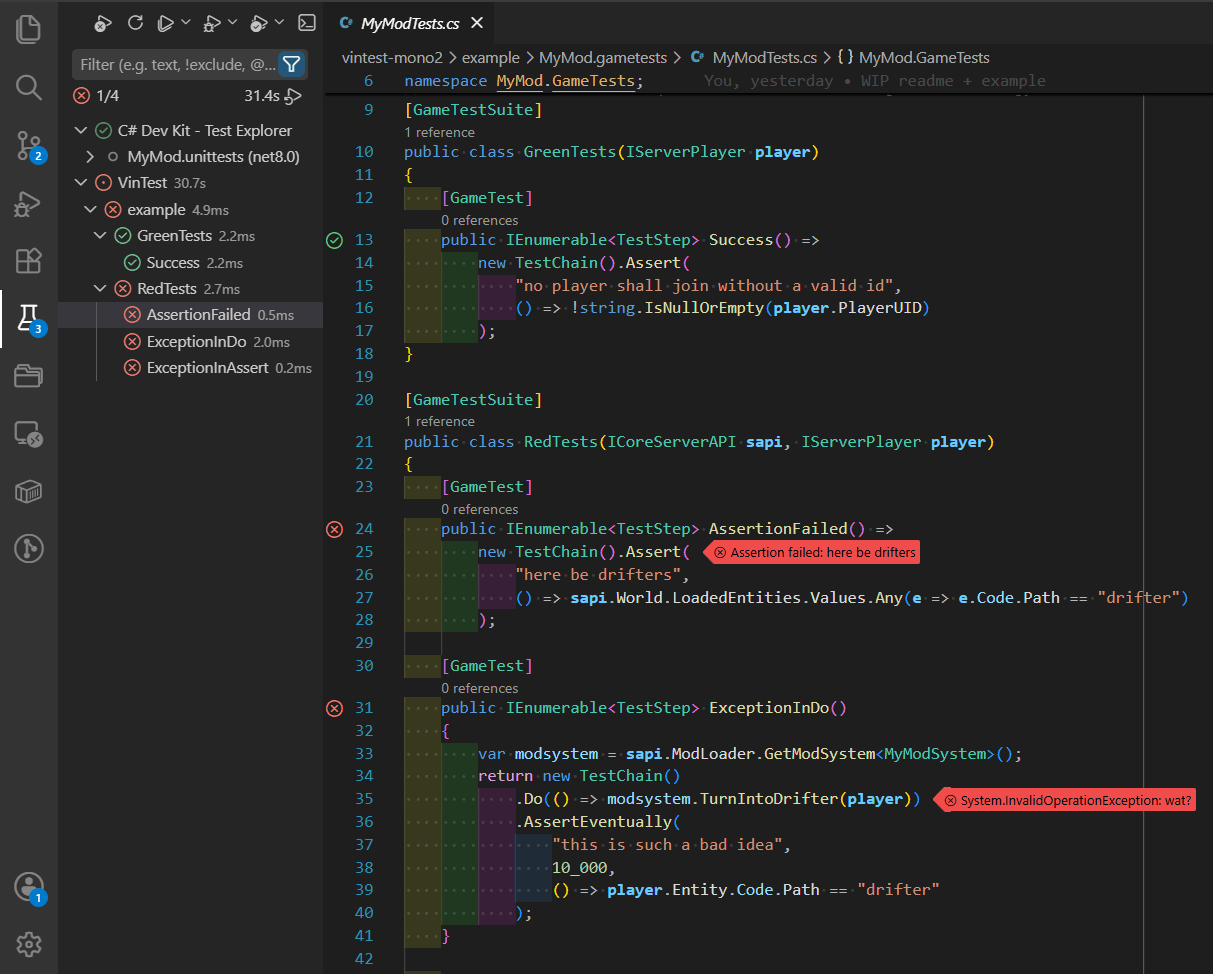
VS Code Extension
Not for the faint of heart!
The extension in its current state is tremendously vibecoded! Integrate AI slop into your dev environment at your own peril.
This part describes how to use the VS Code extension to integrate VinTest framework and
VinTest.Cake task runner into VS Code
Test Explorer.
Installation
The extension is not published in VS Code Marketplace (yet).
- Get the
.vsixfrom vintest Releases - Install it with
Extensions: Install from VSIX ...command in vscode
Usage
Open a folder or a workspace containing the mods where VinTest is already used.
Click the Testing icon in the left bar of VS Code.
This should give you the tree-view of all the test suites and test cases available.
Clicking the Run Test button will effectively call a
dotnet run --project CakeBuild command with all the necessary arguments to run a single test case,
single test suite, or the entire gametests project.
Clicking the Debug Test button will do the same,
plus attach a .NET debugger to the spawned Vintage Story process (you might need to install
additional extensions for it to work).
Configuration
The extension has multiple knobs to adjust its behavior.
When editing JSON settings, simply start typing "vintest., and VS Code autocompletion should give
you the rest.
When navigating Settings in UI, search for vintest to see the full list with descriptions.
See VS Code Extension Reference for more details.